You can pay with cash at a MoneyGram location. You will need three pieces of information from the Prisma Resident Portal.
Step 1: Open Make Payment #
On the Dashboard (the first page you see after you log in), select Make a Payment. You can also select Make Payment in the menu on the left.
Step 2: Choose MoneyGram #
Under Payment Type, select MoneyGram.
Step 3: Find your local MoneyGram #
Find your local MoneyGram location here. Payment processes may vary depending on your location. Ask an associate for help if you are unfamiliar with MoneyGram.
Step 4: Check the payment details #
Look at the amounts shown:
- Payment Amount: the amount that goes toward your balance.
- MoneyGram Fee: the fee for this payment, if any.
- Total Transaction Amount: the total you will pay at MoneyGram.
Step 5: Write down the Company Name and Receive Code #
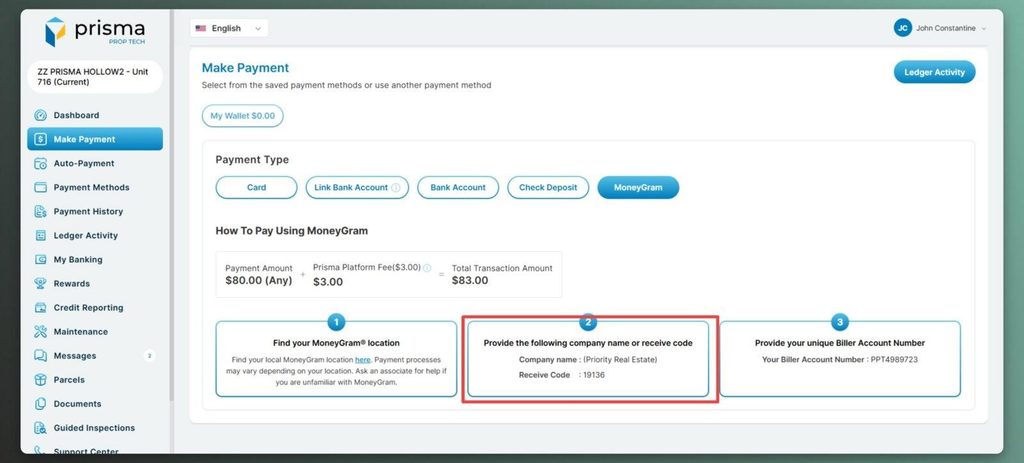
Under step 2 on the screen, find the Company Name and Receive Code. Write them down or print the page. You will give them to the MoneyGram associate.
Step 6: Write down your Biller Account Number #
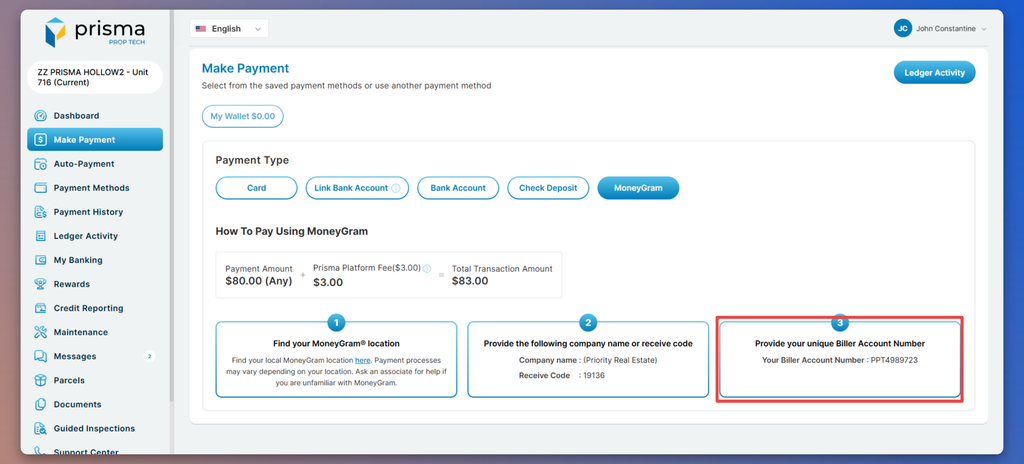
Under step 3 on the screen, find your Biller Account Number. This number is yours. It makes sure the payment goes to your account. Write it down carefully.
Step 7: Find a MoneyGram location #
Under Find your MoneyGram location, select the link to find a location near you.
Step 8: Pay at MoneyGram #
Tell the associate you want to make a bill payment. Give them the Company Name, Receive Code, Biller Account Number, and your cash. Check all details before you pay.
Step 9: Keep your receipt #
Keep your MoneyGram receipt or confirmation number. After a few business days, check Payment History in the Prisma Resident Portal to make sure the payment arrived.


